

Invoicing Is Still Broken for Freight Brokers
Teams are not slow. The workflow is.
PoDs sit in inboxes. Carrier documents arrive in mixed files. Teams still search, download, verify, and match documents before they can even create an invoice.
The problem is not invoicing. The problem is everything that happens before it.
Invoice approval is delayed. Sending invoices is delayed. Cash flow is delayed because invoices are delayed.
You do not have an AR problem. You have an invoice readiness problem.
<div class="lhz-callout">You do not have an AR problem. You have an invoice readiness problem.</div>Companies that automate accounts receivable reduce DSO by an average of 13 days, and 73% report faster cash flow (Billtrust, 2026 Transportation AR Automation Research). Yet most freight brokers still rely on inboxes, PDFs, and manual workflows to get invoices out.
The reason is simple: most AR tools were never built for freight.
<div class="lhz-mock">
<div class="lhz-mock-head">
<div class="lhz-mock-title">Why Invoices Get Delayed</div>
<div class="lhz-mock-dot"><span></span><span></span><span></span></div>
</div>
<div style="display:grid;grid-template-columns:1fr 1fr;gap:24px;">
<div style="border:1px solid #D9D2C2;border-radius:12px;padding:24px;background:#F7F4EC;">
<h4 style="font-size:13px;letter-spacing:0.2em;text-transform:uppercase;margin-bottom:18px;color:#6B655A;font-weight:600;">Manual Workflow</h4>
<div style="display:flex;align-items:center;gap:12px;padding:12px 14px;border-radius:8px;background:#fff;border:1px solid #D9D2C2;font-size:14px;margin-bottom:8px;"><span style="width:24px;height:24px;border-radius:50%;background:#C0453A;color:#fff;font-size:11px;font-weight:700;display:flex;align-items:center;justify-content:center;">1</span>Email Inbox</div>
<div style="display:flex;align-items:center;gap:12px;padding:12px 14px;border-radius:8px;background:#fff;border:1px solid #D9D2C2;font-size:14px;margin-bottom:8px;"><span style="width:24px;height:24px;border-radius:50%;background:#C0453A;color:#fff;font-size:11px;font-weight:700;display:flex;align-items:center;justify-content:center;">2</span>Download PoD</div>
<div style="display:flex;align-items:center;gap:12px;padding:12px 14px;border-radius:8px;background:#fff;border:1px solid #D9D2C2;font-size:14px;margin-bottom:8px;"><span style="width:24px;height:24px;border-radius:50%;background:#C0453A;color:#fff;font-size:11px;font-weight:700;display:flex;align-items:center;justify-content:center;">3</span>Rename Files</div>
<div style="display:flex;align-items:center;gap:12px;padding:12px 14px;border-radius:8px;background:#fff;border:1px solid #D9D2C2;font-size:14px;margin-bottom:8px;"><span style="width:24px;height:24px;border-radius:50%;background:#C0453A;color:#fff;font-size:11px;font-weight:700;display:flex;align-items:center;justify-content:center;">4</span>Find Load</div>
<div style="display:flex;align-items:center;gap:12px;padding:12px 14px;border-radius:8px;background:#fff;border:1px solid #D9D2C2;font-size:14px;margin-bottom:8px;"><span style="width:24px;height:24px;border-radius:50%;background:#C0453A;color:#fff;font-size:11px;font-weight:700;display:flex;align-items:center;justify-content:center;">5</span>Verify Docs</div>
<div style="display:flex;align-items:center;gap:12px;padding:12px 14px;border-radius:8px;background:#fff;border:1px solid #D9D2C2;font-size:14px;margin-bottom:8px;"><span style="width:24px;height:24px;border-radius:50%;background:#C0453A;color:#fff;font-size:11px;font-weight:700;display:flex;align-items:center;justify-content:center;">6</span>Upload to TMS</div>
<div style="display:flex;align-items:center;gap:12px;padding:12px 14px;border-radius:8px;background:#fff;border:1px solid #D9D2C2;font-size:14px;margin-bottom:8px;"><span style="width:24px;height:24px;border-radius:50%;background:#C0453A;color:#fff;font-size:11px;font-weight:700;display:flex;align-items:center;justify-content:center;">7</span>Create Invoice</div>
<div style="display:flex;align-items:center;gap:12px;padding:12px 14px;border-radius:8px;background:#fff;border:1px solid #D9D2C2;font-size:14px;margin-bottom:8px;"><span style="width:24px;height:24px;border-radius:50%;background:#C0453A;color:#fff;font-size:11px;font-weight:700;display:flex;align-items:center;justify-content:center;">8</span>Approve & Send</div>
<span style="display:inline-block;margin-top:14px;font-size:11px;letter-spacing:0.18em;text-transform:uppercase;padding:6px 10px;border-radius:999px;font-weight:600;background:#F7E6E3;color:#C0453A;">Avg. 2.11 Days</span>
</div>
<div style="border:1px solid #E8D9B0;border-radius:12px;padding:24px;background:linear-gradient(180deg,#FBF6E8 0%,#F7F4EC 100%);">
<h4 style="font-size:13px;letter-spacing:0.2em;text-transform:uppercase;margin-bottom:18px;color:#A9842F;font-weight:600;">Lighthouz AI Workflow</h4>
<div style="display:flex;align-items:center;gap:12px;padding:12px 14px;border-radius:8px;background:#fff;border:1px solid #E8D9B0;font-size:14px;margin-bottom:8px;"><span style="width:24px;height:24px;border-radius:50%;background:#A9842F;color:#fff;font-size:11px;font-weight:700;display:flex;align-items:center;justify-content:center;">1</span>Email Received</div>
<div style="display:flex;align-items:center;gap:12px;padding:12px 14px;border-radius:8px;background:#fff;border:1px solid #E8D9B0;font-size:14px;margin-bottom:8px;"><span style="width:24px;height:24px;border-radius:50%;background:#A9842F;color:#fff;font-size:11px;font-weight:700;display:flex;align-items:center;justify-content:center;">2</span>AI Captures PoD</div>
<div style="display:flex;align-items:center;gap:12px;padding:12px 14px;border-radius:8px;background:#fff;border:1px solid #E8D9B0;font-size:14px;margin-bottom:8px;"><span style="width:24px;height:24px;border-radius:50%;background:#A9842F;color:#fff;font-size:11px;font-weight:700;display:flex;align-items:center;justify-content:center;">3</span>AI Matches Load</div>
<div style="display:flex;align-items:center;gap:12px;padding:12px 14px;border-radius:8px;background:#fff;border:1px solid #E8D9B0;font-size:14px;margin-bottom:8px;"><span style="width:24px;height:24px;border-radius:50%;background:#A9842F;color:#fff;font-size:11px;font-weight:700;display:flex;align-items:center;justify-content:center;">4</span>AI Validates Docs</div>
<div style="display:flex;align-items:center;gap:12px;padding:12px 14px;border-radius:8px;background:#fff;border:1px solid #E8D9B0;font-size:14px;margin-bottom:8px;"><span style="width:24px;height:24px;border-radius:50%;background:#A9842F;color:#fff;font-size:11px;font-weight:700;display:flex;align-items:center;justify-content:center;">5</span>AI Uploads to TMS</div>
<div style="display:flex;align-items:center;gap:12px;padding:12px 14px;border-radius:8px;background:#fff;border:1px solid #E8D9B0;font-size:14px;margin-bottom:8px;"><span style="width:24px;height:24px;border-radius:50%;background:#A9842F;color:#fff;font-size:11px;font-weight:700;display:flex;align-items:center;justify-content:center;">6</span>Invoice Approved</div>
<div style="display:flex;align-items:center;gap:12px;padding:12px 14px;border-radius:8px;background:#fff;border:1px solid #E8D9B0;font-size:14px;margin-bottom:8px;"><span style="width:24px;height:24px;border-radius:50%;background:#A9842F;color:#fff;font-size:11px;font-weight:700;display:flex;align-items:center;justify-content:center;">7</span>Invoice Sent</div>
<span style="display:inline-block;margin-top:14px;font-size:11px;letter-spacing:0.18em;text-transform:uppercase;padding:6px 10px;border-radius:999px;font-weight:600;background:#E3F0E8;color:#1F6E4F;">Avg. 3 Minutes</span>
</div>
</div>
</div>Existing AR Tools Were Not Built for Freight
Most AR tools assume invoices are already ready to send. Freight does not work like that.
Invoices depend on PoDs, carrier documents, and load-level validation. Documents arrive across inboxes, attachments, and bundled files. Nothing is structured or ready by default.
Generic AR tools:
- Do not pull documents from inboxes
- Do not separate PoDs from mixed files
- Do not verify documentation accuracy
- Do not match documents to loads
- Do not connect document readiness to invoicing
The result is that teams still switch between TMS platforms, email, shared drives, and accounting tools just to send one invoice. Invoicing is always waiting on something — a missing document, an unclear match, or a delayed validation. And every day it waits is a day cash does not move.
Instead of speeding up invoicing, these tools ignore the actual bottleneck: invoice readiness. That is exactly the problem Lighthouz AI solves.
<div class="lhz-mock">
  <div class="lhz-mock-head">
    <div class="lhz-mock-title">Generic AR vs Lighthouz AI</div>
    <div class="lhz-mock-dot"><span></span><span></span><span></span></div>
  </div>
  <table class="lhz-cmp-table">
    <thead>
      <tr>
        <th>Capability</th>
        <th>Generic AR</th>
        <th class="lhz-lhz">Lighthouz AI</th>
      </tr>
    </thead>
    <tbody>
      <tr><td>Pulls PoDs from Email</td><td class="neg">✕ Not supported</td><td class="lhz-col"><span class="lhz-check">✓</span> Automatic</td></tr>
      <tr><td>Matches Documents to Loads</td><td class="neg">✕ Manual</td><td class="lhz-col"><span class="lhz-check">✓</span> Automatic</td></tr>
      <tr><td>Verifies Documentation</td><td class="neg">✕ Not supported</td><td class="lhz-col"><span class="lhz-check">✓</span> Automatic</td></tr>
      <tr><td>Separates Mixed Files</td><td class="neg">✕ Manual</td><td class="lhz-col"><span class="lhz-check">✓</span> Automatic</td></tr>
      <tr><td>Uploads to TMS</td><td class="neg">✕ Manual</td><td class="lhz-col"><span class="lhz-check">✓</span> Automatic</td></tr>
      <tr><td>Sends Invoices</td><td class="neg">Partial</td><td class="lhz-col"><span class="lhz-check">✓</span> Automatic</td></tr>
    </tbody>
  </table>
</div>
Lighthouz AI Gives Brokers One Real-Time AR Workflow
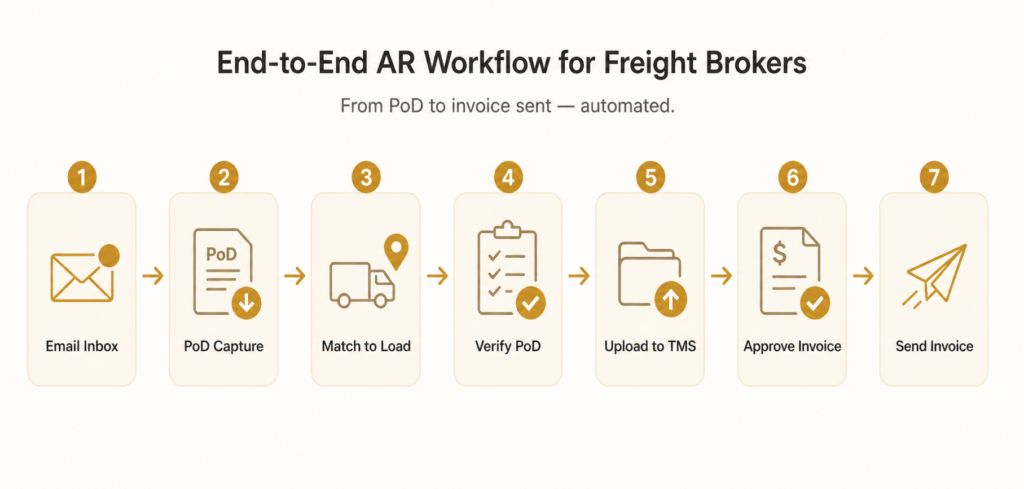
Lighthouz AI connects PoD intake, validation, and invoicing into one continuous workflow.
Instead of waiting for documents and manually preparing invoices, teams move from document arrival to invoice sent without switching systems or chasing missing inputs. The workflow starts when the document enters the system — not when someone finally finds it later in the day.
Lighthouz AI removes the handoff between operations and finance. There is no back-and-forth to confirm whether documents are ready, no delay waiting for someone to validate a file, and no gap between document preparation and invoicing.
Everything moves forward in sequence — automatically. Instead of reacting to missing documents, teams work from a system where documents are already captured, validated, and ready. Instead of chasing readiness, they work on exceptions.
<div class="lhz-callout">Invoices do not get delayed at the end. They get delayed at the start.</div><div class="lhz-mock">
<div class="lhz-mock-head">
<div class="lhz-mock-title">Invoice Readiness Pipeline</div>
<div class="lhz-mock-dot"><span></span><span></span><span></span></div>
</div>
<div class="lhz-pipeline">
<div class="lhz-pipe-node done">PoD Arrives</div>
<div class="lhz-pipe-line"></div>
<div class="lhz-pipe-node done">Captured</div>
<div class="lhz-pipe-line"></div>
<div class="lhz-pipe-node done">Matched</div>
<div class="lhz-pipe-line"></div>
<div class="lhz-pipe-node done">Verified</div>
<div class="lhz-pipe-line"></div>
<div class="lhz-pipe-node done">Uploaded</div>
<div class="lhz-pipe-line"></div>
<div class="lhz-pipe-node done">Invoice Ready</div>
<div class="lhz-pipe-line"></div>
<div class="lhz-pipe-node done">Sent</div>
</div>
</div>Invoices do not get delayed at the end. They get delayed at the start.
1. Lighthouz AI Pulls PoDs Directly from Email
Customer and carrier documents arrive across inboxes, often buried in long threads and scattered attachments.
Lighthouz AI pulls PoDs directly from email as soon as they arrive — without manual downloads, forwarding, or document chasing. It captures attachments, embedded files, and documents across different formats, including carrier emails and factoring packets.
In a typical workflow, someone has to open emails, download attachments, rename files, and move them into the right place. That step alone slows down invoicing across dozens or hundreds of loads.
Lighthouz AI removes that step completely. Documents are captured automatically and made available for the next stage without manual handling.
PoDs no longer sit buried in inboxes.
2. Lighthouz AI Matches PoDs to the Correct Load
Once documents are captured, the next delay is matching them to the correct shipment.
Lighthouz AI automatically matches each PoD to the correct load, linking documents directly to shipment data. That removes the need for manual cross-checking, load searching, or guessing where a document belongs.
Without automation, this step creates constant friction. Teams verify references, check load IDs, and confirm that the right document is tied to the right shipment — for every load, every day.
With Lighthouz AI, that connection happens immediately. The document and the load stay aligned from the start, so the invoicing process does not slow down mid-way.
Teams no longer manually match documents to loads.
3. Lighthouz AI Verifies PoD Accuracy
Finding a document is not enough. It has to be usable.
Lighthouz AI verifies PoD accuracy before invoices are created, identifying missing, incomplete, or incorrect documents early in the process. Problems are surfaced before they create rework downstream.
In a manual workflow, issues are often discovered late — during invoice approval or after sending — which leads to delays, corrections, and follow-ups that push cash collection back further.
Lighthouz AI shifts that validation upstream. Documents are checked as they enter the workflow, so only valid and complete information moves forward.
Invoices are not delayed due to incomplete or incorrect documentation.
4. Lighthouz AI Separates PoDs from Mixed Documents
Carrier packets and factoring documents often include multiple files bundled together, which makes document handling messy.
Lighthouz AI separates PoDs from mixed documents automatically, extracting the relevant file from multi-document uploads. This removes the need to open, review, and sort through each file manually.
In high-volume operations, this step consumes significant time. Teams repeatedly open files just to locate one document needed for invoicing.
Lighthouz AI eliminates that effort. The correct document is identified and extracted immediately, so teams focus on moving the invoice forward instead of sorting files.
Teams do not waste time digging through documents.
5. Lighthouz AI Uploads PoDs to the TMS
After documents are verified, they still need to be stored and linked correctly.
Lighthouz AI uploads PoDs directly to the TMS and attaches them to the correct load. Documentation stays organized, accessible, and aligned with shipment data — without manual uploads or updates.
In manual workflows, even after documents are ready, teams still upload and attach them separately. That is another delay before invoicing can proceed.
Lighthouz AI removes that final step. Documents are already where they need to be, ready for invoicing without additional effort.
Documentation is always where it should be.
6. Lighthouz AI Approves and Sends Invoices
Once documentation is ready, invoicing should not be another bottleneck.
Lighthouz AI completes the workflow by approving invoices and sending them via email automatically. Instead of waiting for manual review and action, invoices move forward as soon as the required documents are ready.
In many teams, this final step creates unnecessary delay. Even when everything is ready, invoices sit in queues waiting for approval or sending.
Lighthouz AI removes that delay. As soon as documentation is complete, the invoice is approved and sent — keeping the entire workflow moving without interruption.
Invoices go out faster without manual intervention.
Freight Brokers Need an AR Workflow Built for Freight
Manual invoicing workflows are slow, fragmented, and dependent on missing inputs.
Freight brokers do not need another generic AR tool that assumes invoices are already ready. They need a system built around how freight invoicing actually works — documents first, validation next, and invoicing after.
This is not just an operations problem. It is a cash flow timing problem.
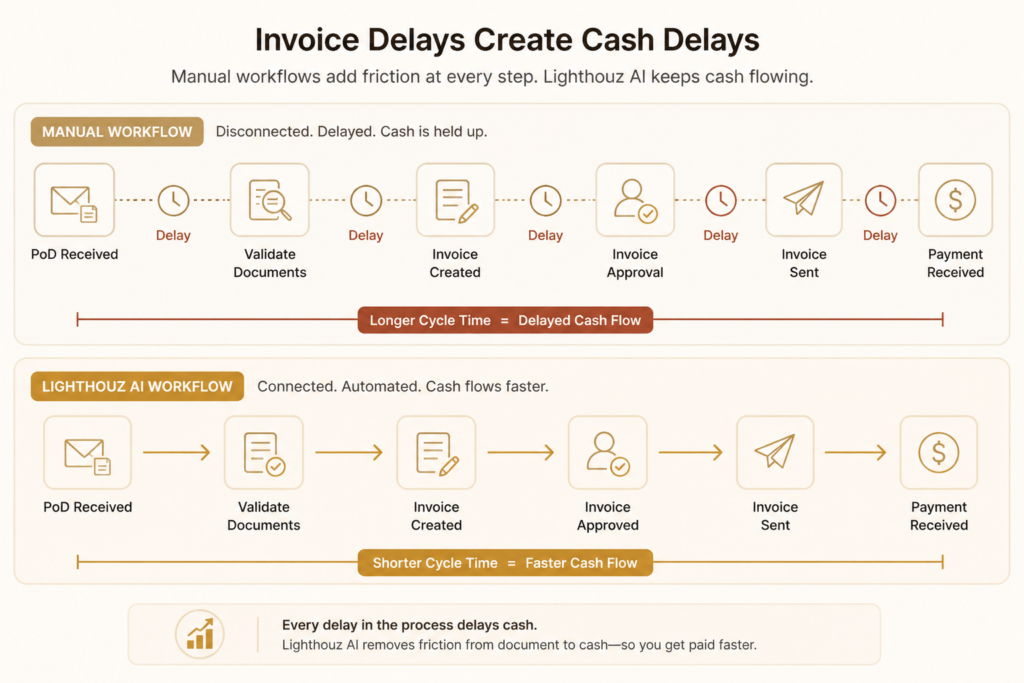
When invoices are delayed, revenue recognition is delayed, cash collection is delayed, and visibility into financial performance becomes less reliable. Lighthouz AI aligns operations and finance into one workflow, removing delays caused by disconnected systems and manual coordination.
<div class="lhz-callout">If invoices are delayed, cash is delayed.</div>The Impact Is Immediate
NAD Logistics reduced invoicing time by 78%, cutting processing time from 2.11 days to 0.47 days. The team also saved 90–120 minutes every day and achieved ROI in under six months.
<div class="lhz-roi">
<div class="brand">Case Study</div>
<h3>NAD Logistics</h3>
<div class="lhz-roi-hero">
<div class="big">78%</div>
<div class="lbl">Faster Invoicing</div>
</div>
<div class="lhz-roi-grid">
<div class="cell">
<div class="num">2.11 → 0.47</div>
<div class="sub">Days Processing Time</div>
</div>
<div class="cell">
<div class="num">90–120</div>
<div class="sub">Minutes Saved Daily</div>
</div>
<div class="cell">
<div class="num"><6</div>
<div class="sub">Months to ROI</div>
</div>
</div>
</div>If your team is still waiting on PoDs, searching inboxes, and manually sending invoices, you are already behind.
Book a demo with Lighthouz AI.
<div class="lhz-cta">
  <h2>Still Waiting On</h2>
  <div class="lhz-cta-wait">
    <span>✕ Emails</span>
    <span>✕ Missing PoDs</span>
    <span>✕ Validation</span>
    <span>✕ Uploads</span>
    <span>✕ Approvals</span>
  </div>
  <div class="lhz-cta-arrow">↓</div>
  <h3>Lighthouz AI</h3>
  <p>Everything Ready. Automatically.</p>
  <a href="https://lighthouz.ai/" class="lhz-btn">Book a Demo</a>
</div>